
Help Tables, columns and indexes
Table options
Table options are the settings that belong to the table as a whole rather than to one column. In the table designer, the most used ones (engine, character set and collation) sit at the top, above the tabs; the rest are on the 5 Advanced tab.
To open the designer, see Creating a table (F4) or Changing a table (F6).
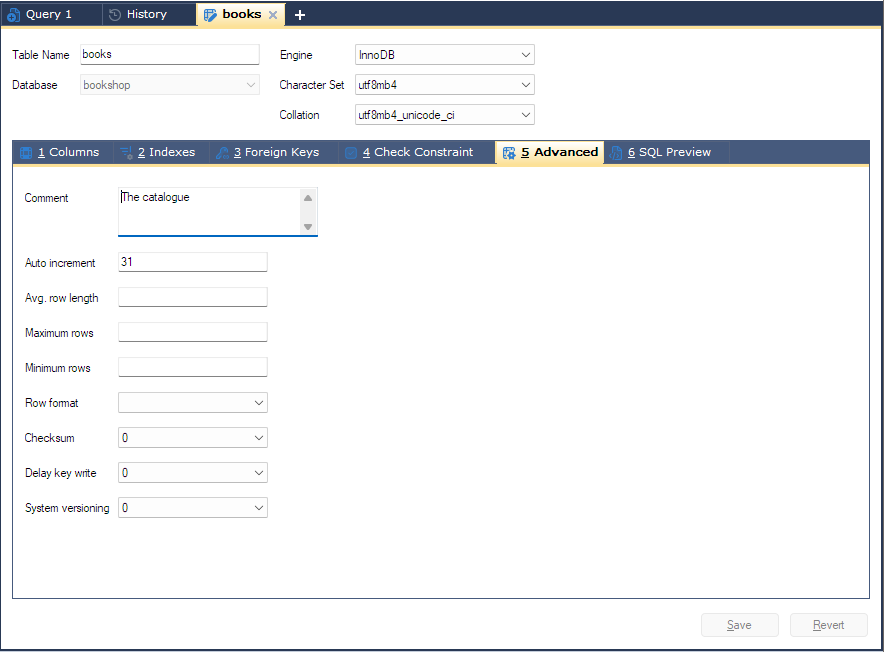
At the top of the designer
| Field | What it does |
|---|---|
| Engine | The storage engine, from the list the server reports. For a new table, [default] leaves it to the server. Foreign keys need an engine that supports them, such as InnoDB. For an existing table with another engine, bonSQL will not open the Foreign Keys tab; for a new table, the foreign keys are left out of the statement. See Foreign keys. |
| Character Set | The table’s default character set. Columns can still set their own on the Columns tab. |
| Collation | The table’s default collation. The list shows the collations of the chosen character set. |
On Save, a value is only written if it differs from what the table already has: ENGINE=, charset=
and collate=.
The Advanced tab
| Field | What it does |
|---|---|
| Comment | A comment stored with the table. Up to 2048 characters on MySQL 5.5.3 and MariaDB 5.5 and later, 60 on older servers. |
| Auto increment | The next value the auto-increment column will hand out (auto_increment=). For an existing table it shows the current value. |
| Avg. row length | avg_row_length=, a sizing hint for the server. |
| Maximum rows | max_rows=, a sizing hint for the server. |
| Minimum rows | min_rows=, a sizing hint for the server. |
| Row format | row_format=: dynamic, fixed, compressed, compact or redundant. Which ones the server accepts depends on the engine. |
| Checksum | checksum= 1 or 0. |
| Delay key write | delay_key_write= 1 or 0. |
| System versioning | MariaDB 10.3.4 and later only. 1 makes the table system-versioned (WITH SYSTEM VERSIONING), so the server keeps the history of every row. |
The number fields accept digits only. For a new table, the Row format, Checksum and Delay key write lists start on [default], which means bonSQL writes nothing for that option, so the server’s own default applies. For an existing table they show the table’s current value, and there is no [default] entry.
What is sent
For a new table, the options you set are added after the closing bracket of CREATE TABLE.
For an existing table, only options you changed are sent, as part of the designer’s ALTER TABLE. Changing
System versioning to 1 sends ADD SYSTEM VERSIONING; changing it to 0 sends
DROP SYSTEM VERSIONING. bonSQL reads whether a table is versioned from the server’s
information_schema.TABLES.
Check the SQL Preview tab to see exactly what will be sent; see SQL preview.
Other ways to see or change options
- Table > More Table Operations > View Table Properties opens the Advanced Properties window: the
table’s status as the server reports it (the row of
SHOW TABLE STATUSfor the table) in a read-only Variable / Values list. - Table > More Table Operations > Change Table Type To lists the server’s engines, with the table’s
current engine ticked. Choosing another one changes the engine straight away
(
alter table ... engine = ...), without the designer and without asking first.
Tips
- Only options you change are sent, so opening the Advanced tab and saving without touching it changes nothing.
- Character Set and Collation are hidden on servers older than MySQL 4.1.