
Help Tables, columns and indexes
Table diagnostics
The Table Diagnostics window runs the server’s table maintenance statements (CHECK TABLE,
ANALYZE TABLE, OPTIMIZE TABLE and REPAIR TABLE) on one or more tables of a database, and shows the
server’s report.
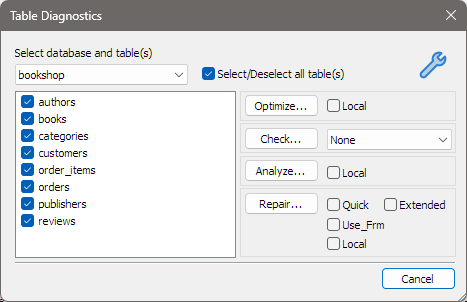
Opening it
Choose Tools > Table Diagnostics… or press Ctrl+Alt+T. Press F1 in the window for this page.
Choosing the tables
| Control | What it does |
|---|---|
| Select database and table(s) | The database, from those shown in the Object Browser. It starts on the one selected there, or on the first one. |
| The table list | The database’s tables, all ticked to begin with. Views are not listed. Untick the tables you want to leave out. |
| Select/Deselect all table(s) | Ticks or unticks every table at once. |
The buttons on the right are greyed while no table is ticked. If the database has no tables, the buttons, options and Select/Deselect all table(s) are all greyed.
The four operations
Each button sends one statement for all the ticked tables together.
| Button | Option | bonSQL sends |
|---|---|---|
| Optimize… | Local | optimize table ...; with Local ticked, optimize NO_WRITE_TO_BINLOG table ... |
| Check… | the list beside it | check table ... followed by the option chosen: Quick, Fast, Medium, Extended or Changed. None adds nothing. |
| Analyze… | Local | analyze table ...; with Local ticked, analyze LOCAL table ... |
| Repair… | Quick, Extended, Use_Frm, Local | repair table ... with QUICK, EXTENDED and USE_FRM added for each box ticked; Local makes it repair NO_WRITE_TO_BINLOG table ... |
Local adds the server’s option for not writing the statement to its binary log (NO_WRITE_TO_BINLOG, of
which LOCAL is another spelling).
Which options a server accepts, and what each does, depends on the server and the table’s engine. If the server refuses one, its error is shown and nothing else happens.
The result
When the statement finishes, bonSQL shows the server’s reply, the rows the statement returns for each table, in a Table Diagnostics Information window. Click OK to go back to the diagnostics window and run another operation.
The window remembers the options you chose (the check type and the tick boxes), and its size and position, for next time. Cancel closes it.
Tips
- Untick everything with Select/Deselect all table(s) and then tick the one or two tables you want, rather than running an operation on a whole database by accident.
- The statements are sent as they are shown above, so you can also type them in a query tab when you want options the window does not offer.
- Before repairing something important, take a copy; see Backing up a database as an SQL dump.