
Help Getting started and windows
SQL templates
SQL templates are short, worked examples of common statements, from a plain SELECT to a stored procedure
with its DELIMITER lines. Each one opens in a new query tab, with placeholder names such as table_name
and col1 for you to replace. They were written for bonSQL; each starts with a comment saying what the
statement does, and many have commented-out variations underneath.
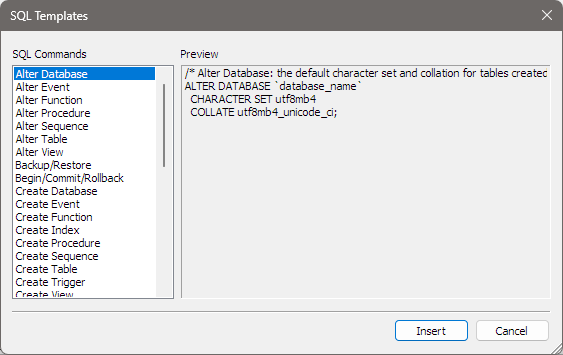
Inserting a template
- Choose Edit > Insert Templates… or press Ctrl+Shift+T.
- Pick a statement from SQL Commands on the left. Preview on the right shows its text.
- Click Insert, or double-click the name.
The template opens in a new query tab, so nothing you have already written is touched. Change the names, delete the lines you do not need, and run it with F9 or Ctrl+F9.
The window can be resized, and bonSQL remembers its size and position. The query editor must be showing; if it is hidden (Ctrl+Shift+3), bonSQL asks you to show it first.
The templates
The list is in alphabetical order. By kind of work:
| Kind | Templates |
|---|---|
| Reading and changing rows | Select, Join, Insert, Insert-Select, Update, Delete, Replace, Truncate, Load Data |
| Databases | Create Database, Alter Database, Drop Database, Use |
| Tables and indexes | Create Table, Alter Table, Rename Table, Drop Table, Describe, Create Index, Backup/Restore |
| Views | Create View, Alter View, Drop View |
| Stored routines | Create Procedure, Alter Procedure, Drop Procedure, Create Function, Alter Function, Drop Function |
| Triggers and events | Create Trigger, Drop Trigger, Create Event, Alter Event, Drop Event |
| Sequences | Create Sequence, Alter Sequence, Drop Sequence |
| Transactions and locks | Begin/Commit/Rollback, Transaction, Lock/Unlock |
Things to know
- Update and Delete start with a commented-out
SELECTusing the sameWHERE. Run that first to see which rows will change. - Create Procedure, Create Function and Create Trigger use
DELIMITERlines so that the semicolons inside the body do not end the statement early. Run them with Ctrl+F9 (all queries). - Load Data reads a CSV file on your computer; the server must allow
local_infile. For a guided import, see Importing CSV data. - Create Event only runs on schedule when the server’s
event_schedulerisON. - The Sequence templates are for MariaDB 10.3 and later.
- Backup/Restore keeps a quick copy of a table inside the database. For a real backup use Backup Database As SQL Dump (Ctrl+Alt+E); see Backing up a database as an SQL dump.
Keeping your own statements
The template list itself cannot be changed. To keep statements of your own for reuse, write them in a query tab and use Favorites > Add To Favorites… (Ctrl+Shift+F). You give the favourite a name and a folder, and it then appears on the Favorites menu. The same dialog can instead add a link to an existing SQL file. Favorites > Organize Favorites… creates folders and renames, moves or deletes favourites.