
Help Getting started and windows
The Messages tab
Every time you run queries from the query editor, the Messages tab in the result pane reports what happened to each one. If any query fails, bonSQL shows this tab when the run ends; otherwise it shows the first Result tab (or this tab, if no query returned rows), and Messages is one click (or one Alt+number) away.
The tab is replaced on every run, so it only ever describes the last run. For older runs, see The History tab.
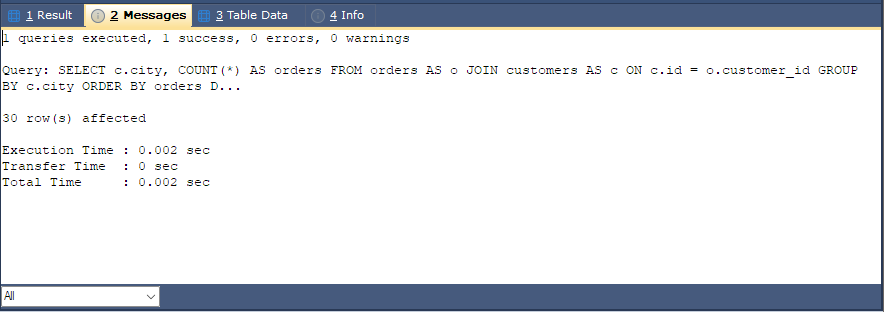
What it shows
The first line sums up the run:
3 queries executed, 2 success, 1 errors, 0 warnings
Then each query has its own block, separated from the next by a dashed line:
| Line | Means |
|---|---|
| Query: | The query, with its comments and line breaks removed. Long queries are cut after 128 characters and end in .... |
n row(s) affected | For a query that returned rows, such as a SELECT, the number of rows returned (the rows are on a Result tab). For any other statement, the number of rows it changed. If the server raised warnings, , n warning(s) follows. |
| Error Code: | The server’s error number, with its message on the next line. |
| Execution Time | How long the server took to run the query. |
| Transfer Time | How long it took to fetch the rows to bonSQL. |
| Total Time | Both together. |
Times are shown as, for example, 0.012 sec, 3 min 5 sec or 1 hr 2 min.
If nothing ran, for instance because the cursor was not inside a query, the tab says No query(s) were executed. Please enter a query in the SQL window or place the cursor inside a query.
Warnings
When a query raises warnings, bonSQL only counts them unless Show Warning(s) in Messages tab is ticked
on the General page of Preferences. With it ticked, bonSQL asks the server for the
warnings (SHOW WARNINGS) and lists each under the query, with its level, code and message, for example:
Warning Code : 1265
Data truncated for column 'price' at row 1
With it unticked, a note under the query says where to turn it on.
Showing only some queries
The list at the bottom of the tab narrows a long report down to the queries you care about:
| Choice | Shows |
|---|---|
| All | Every query. |
| Queries with errors | Only the queries that failed. |
| Queries with warnings | Only the queries with warnings. |
| Queries with errors/warnings | Both. |
| Queries with result set | Only the queries that returned rows. |
| Queries without result set | Only the queries that did not return rows. |
The list goes back to All on the next run.
Copying
Select text and press Ctrl+C to copy it, for example to send an error message to someone. The text is read-only, and the tab has no right-click menu.
Settings that change it
| Setting | Where | Effect |
|---|---|---|
| Show Warning(s) in Messages tab | Preferences, General | Lists warnings in full instead of only counting them. |
| Halt Execution of Queries on Error | Preferences, General | When running all queries, stops at the first error, so the report ends there. |
| Others font | Preferences, Fonts & Editor Settings | The font of this tab (and of the result grids). |
| Messages/Table Data/Info colours | Preferences, Fonts & Editor Settings | The text and background colours of this tab; Text Selection under it, the colour of selected text. |
The status bar also shows Exec: and Total: for the last run, and Running: with the time so far while queries are still running.