
Help Data
Looking up foreign key values
When a column is part of a foreign key, its value has to exist in the table the key refers to (the parent table). Rather than look the value up yourself, you can open a small window that lists the parent table’s rows and pick one.
This works in the Table Data tab, and in an editable Result tab. The column must have a foreign key defined on the server; see Foreign keys. Such columns are marked with an icon in their heading.
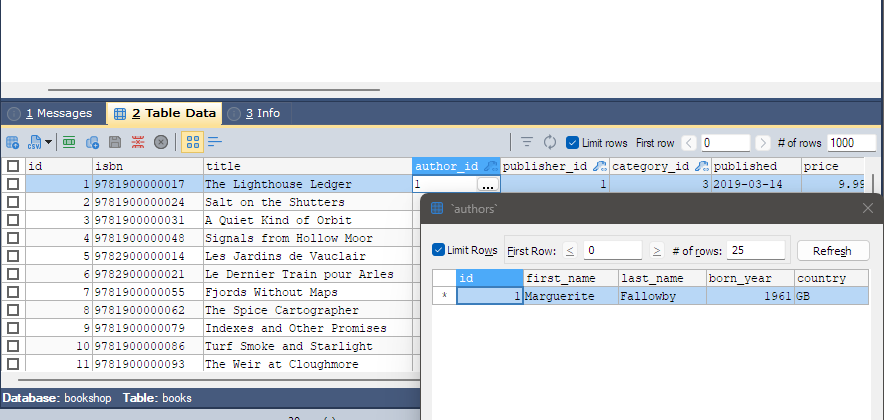
Opening the lookup
- Click a cell in the foreign key column and start editing it (type, or press F2).
- Click the small … button that appears at the right of the cell, or press Ctrl+Space.
The window’s title is the parent table’s name, for example `customers`. If the column refers to
more than one parent table, all are named and their rows are shown side by side.
Whatever you had typed in the cell is used as a first search. bonSQL looks for the parent row with
exactly that value; if there is none, it looks for rows that contain the text. An empty cell, (NULL)
or (Auto) starts with no search.
Picking a row
Select a row and click Select, press Enter, or double-click the row. bonSQL puts that row’s value of the referenced column into your cell and closes the window. The row is saved with your other changes, as usual; see Viewing and editing data.
Cancel closes the window without changing the cell.
Finding the right row
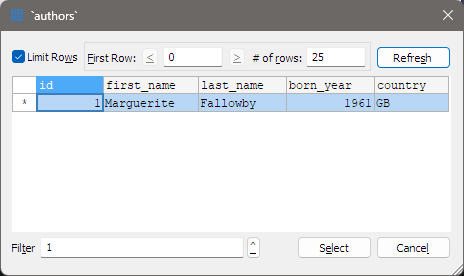
| Control | Does |
|---|---|
| Limit Rows | When ticked, shows one page of the parent table at a time. |
| First Row / < / > | The first row of the page, and buttons to move a page back or forward. Starts at 0. |
| # of rows | How many rows a page holds; 25 to start with. |
| Refresh | Runs the search again with the current filter and limits. While it runs, it reads Stop. |
| Filter | Text to search for. Rows are kept when any of the chosen columns contains the text. Type (NULL) to find rows where those columns are NULL. |
| ^ | Lists the parent table’s columns; tick the ones Filter should search. |
Click a column heading in the list to sort by that column.
For a foreign key made of several columns, the ^ list also has (Filter on values already entered). When ticked, only parent rows that match the values already in the other key columns of your row are shown. bonSQL remembers this setting, and the size of the window, for next time.
When it does not work
- No button in the cell: the column has no foreign key on the server, or the cell cannot be edited (for example a generated column). Check the table’s keys with Table > Relationships/Foreign Keys (F10).
- Ctrl+Space ticks the row instead: the cell was not being edited. Start editing it first.
- The window does not open: the first search query failed, for example because you may not read the parent table.