
Help Getting started and windows
The History tab
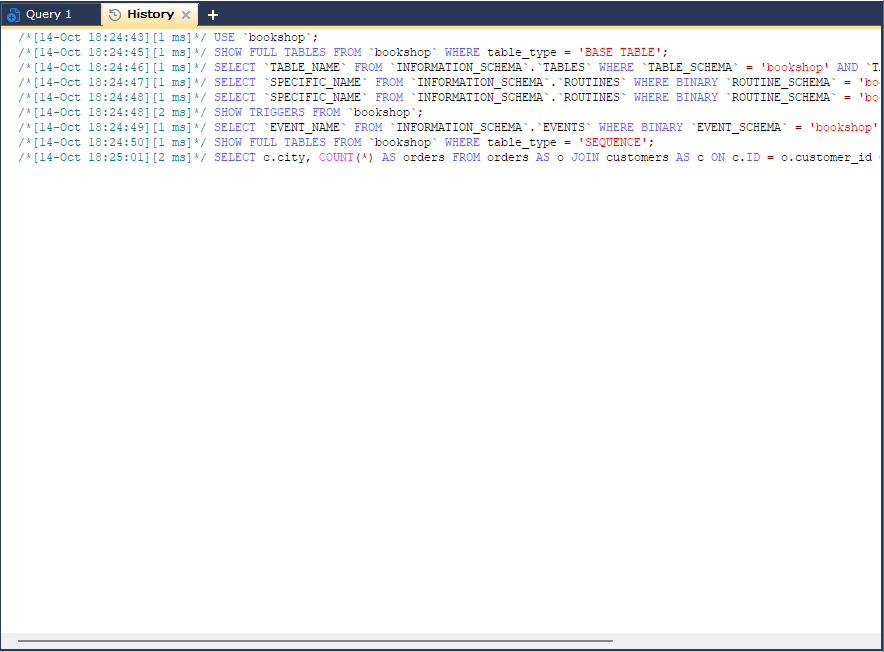
The History tab is a running log of the statements bonSQL has sent to the server on one connection: the ones you ran from the query editor and the ones bonSQL runs itself, for example to fill the Object Browser or to save a change made in a grid. It is useful to see what a dialog actually did, to find a query you ran an hour ago, or to keep a record of a session’s work.
Open it with Ctrl+Shift+H or Tools > History. It is also on the menu of the + at the end of the query tabs. Each connection has its own history.
Where it appears
By default the History tab opens as a tab of its own, next to the query tabs. With History under Query tabs ticked on the General page of Preferences, it appears instead as a tab in the result pane of each query tab, next to Messages and Result.
Closing the History tab only hides it; the log carries on, and it is all there when you open the tab again.
What each line shows
Each statement is one line, with the date, the time and how long it took in front of it, inside a comment:
/*[14-Oct 10:42:07][12 ms]*/ SELECT * FROM `shop`.`orders` WHERE `id` = 42;
A statement that failed has the server’s error after it:
/*[14-Oct 10:42:31][1 ms]*/ SELECT * FROM `shop`.`order`; /*[Error Code 1146: Table 'shop.order' doesn't exist]*/
Line breaks inside a statement are removed, so each statement fits on one line. Because the details are in comments, you can copy lines straight into the query editor and run them again. The time uses the time format set in Windows.
Statements longer than 4 KB are not logged. The tab keeps the latest 50,000 lines; older ones are dropped from the top.
The right-click menu
| Item | Does |
|---|---|
| Remove History | Clears the log for this connection. |
| Copy (Ctrl+C) | Copies the selected text. |
| Copy All | Copies the whole log. |
| Save History To File… (Ctrl+S) | Saves the log as an SQL file. |
| Select All (Ctrl+A) | Selects the whole log. |
| Find… (Ctrl+F) and Find Next (F3) | Searches the log. |
The log is read-only; to change a statement, copy it to a query tab first.
Settings that change it
| Setting | Where | Effect |
|---|---|---|
| History under Query tabs | Preferences, General | Shows the history in each query tab’s result pane instead of as a tab of its own. |
| History/Info font | Preferences, Fonts & Editor Settings | The font of this tab. |
The statements are coloured with the same colours as the query editor.
Tips
- After using a dialog, such as altering a table, look at the end of the history to see the exact statements it sent.
- Use Save History To File… at the end of a piece of work to keep a record of what was changed.