
Help Databases and objects
Functions
A stored function is a block of SQL kept on the server that returns one value, and can be used inside other statements like a built-in function. bonSQL writes functions as SQL: it opens an editor tab with a statement for you to complete or change, and you run it like any other query.
The commands are under Others > Functions, and on the menu you get by right-clicking a database’s Functions folder or a function in the Object Browser. With that folder or a function selected, F4, F6 and Del act on functions.
Creating a function
Select the database, then choose Others > Functions > Create Function… (F4) or Database > Create > Function….
Type a name in Enter new function name and click Create. If a function of that name already exists in the database, bonSQL says so.
A new editor tab opens with a skeleton:
DELIMITER $$

CREATE
    /*[DEFINER = { user | CURRENT_USER }]*/
    FUNCTION `shop`.`net_price`()
    RETURNS type
    /*LANGUAGE SQL
    | [NOT] DETERMINISTIC
    | { CONTAINS SQL | NO SQL | READS SQL DATA | MODIFIES SQL DATA }
    | SQL SECURITY { DEFINER | INVOKER }
    | COMMENT 'string'*/
    BEGIN

    END$$

DELIMITER ;
Add the parameters between the brackets, replace
typewith the type of the value returned, for exampleDECIMAL(10,2), and write the body betweenBEGINandEND, ending with aRETURN.Press F9, or click Execute query on the toolbar.
The Messages tab shows whether the server accepted it. If the function does not appear in the Object Browser, press F5.
Keep the DELIMITER $$ and DELIMITER ; lines: they let the semicolons inside the body through; see
Stored procedures.
Running the editor tab
In an object editor tab, F9, Ctrl+F9 and the toolbar’s Execute query button all run the whole tab. F8 is not available there. In SQLyog Community the Execute button was greyed out in these tabs; in bonSQL it works.
Changing a function
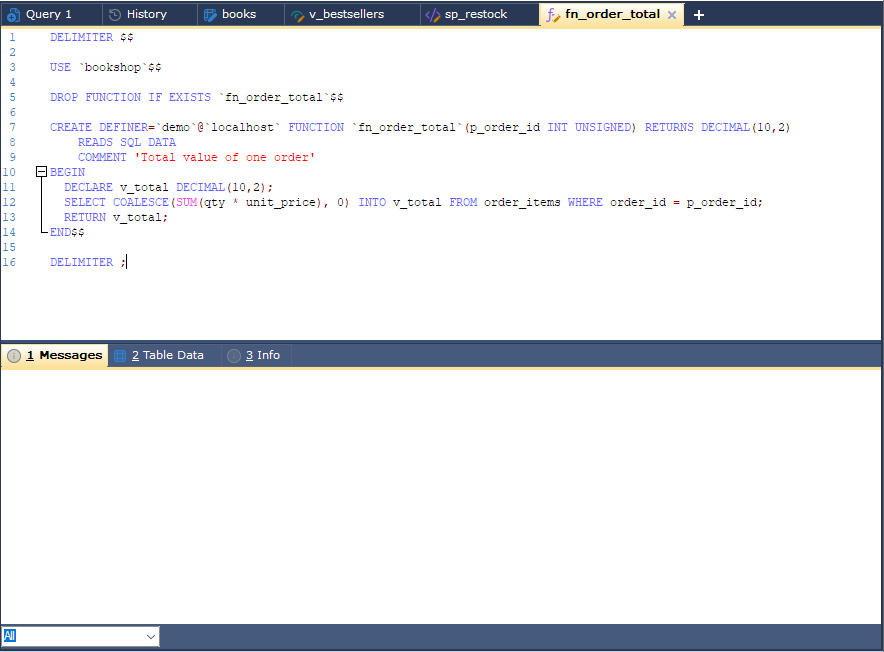
Select the function and choose Others > Functions > Alter Function… (F6). The tab holds,
between the DELIMITER lines, a USE statement, a
DROP FUNCTION IF EXISTS for the function, and its current CREATE statement read from the server. Edit the
CREATE part and execute the tab: the function is dropped and created again.
If the server rejects the new CREATE, the drop has already happened and the function is gone. Your text is
still in the tab: correct it and execute again.
Dropping a function
Select it and choose Others > Functions > Drop Function… (Del). bonSQL asks you to confirm, then drops it and removes it from the Object Browser.
Trying it out
Use it in a query tab like a built-in function, for example SELECT net_price(42); once you have given it a
parameter, and press F9.