
Help Tables, columns and indexes
Foreign keys
A foreign key ties columns in one table (the referencing, or child, table) to columns in another (the referenced, or parent, table). In bonSQL foreign keys are made and changed on the 3 Foreign Keys tab of the table designer of the child table.
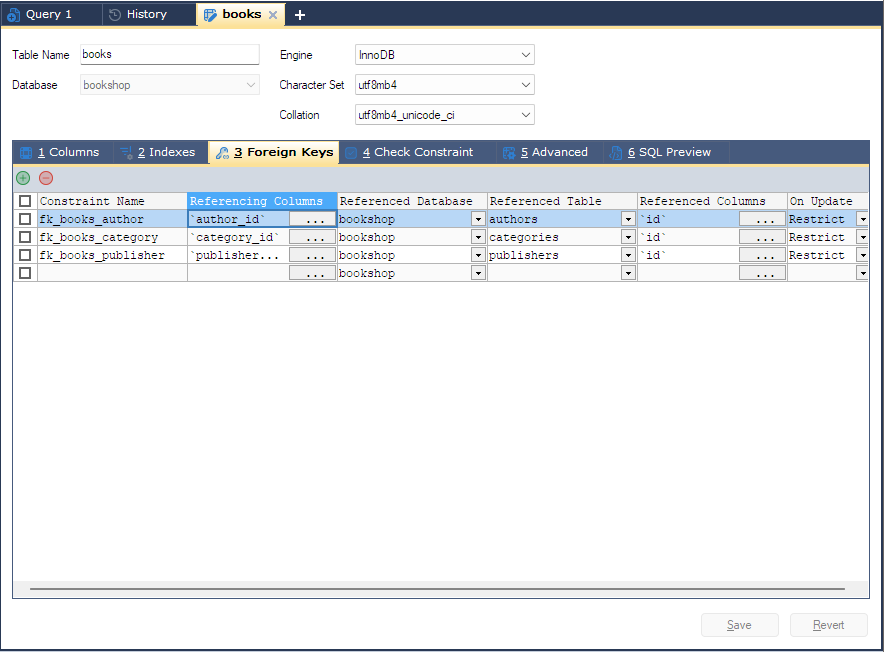
Opening it
- Select the child table in the Object Browser and press F10, or choose Table > Relationships/Foreign Keys (also on the menu you get by right-clicking the table). The designer opens on the Foreign Keys tab.
- In a designer that is already open, click 3 Foreign Keys.
Foreign keys need a storage engine that has them. If the table’s engine does not, bonSQL says:
The selected table does not support foreign keys. Table engine must be InnoDB, PBXT, SolidDB or ndbcluster (if ndbcluster engine version is greater than or equal to 7.3).
and the tab cannot be opened. For a new table, choosing such an engine at the top of the designer means the foreign keys on this tab are left out of the statement.
The grid
Each row is one foreign key. Type in the empty row at the bottom to add one, or click the green + button above the grid (Alt+Ins).
| Grid column | What to enter |
|---|---|
| Constraint Name | The key’s name. Leave it empty and bonSQL writes no name, so the server chooses one. |
| Referencing Columns | The columns in this table. Click the … button in the cell, tick the columns, put them in order with Up and Down, and click OK. |
| Referenced Database | The parent table’s database. |
| Referenced Table | The parent table, from the base tables of that database. |
| Referenced Columns | The parent’s columns. Click the … button in the cell: the list holds the columns of the parent table’s indexes, and bonSQL ticks the first index whose column types match the referencing columns. |
| On Update | The on update rule: No Action, Cascade, Set null or Restrict. |
| On Delete | The on delete rule, with the same choices. |
Leave On Update or On Delete empty and bonSQL writes no rule, so the server’s default applies. What each rule does is decided by the server; its manual has the details.
The number of referencing and referenced columns must match, and they are paired in order: the first referencing column with the first referenced column, and so on.
Rules on existing keys
When the server stores a key with its default rule, SHOW CREATE TABLE leaves the rule out. The default is
not the same everywhere, so bonSQL fills the gap with the server’s own: Restrict on MariaDB and
No Action on MySQL. A MariaDB key created with RESTRICT therefore shows as Restrict, not as an empty
cell.
Saving
On Save, bonSQL checks every row and stops with one of these if something is missing:
| Message | Fix |
|---|---|
No referencing columns selected for the foreign key | Choose Referencing Columns. |
Referenced database not selected | Choose Referenced Database. |
Referenced table not selected | Choose Referenced Table. |
No referenced columns selected for the foreign key | Choose Referenced Columns. |
The number of referencing and referenced columns do not match | Tick the same number on both sides. |
New keys are written as add constraint ... foreign key (...) references ...(...) with on update and
on delete when set, inside the designer’s ALTER TABLE, or inside CREATE TABLE for a new table.
Changing a foreign key
A foreign key cannot be changed in place; bonSQL drops it and creates it again.
If you keep the name, bonSQL first warns:
There is no direct way to alter a foreign key in MySQL or MariaDB. bonSQL will drop the existing key and create a new one with the same name. If the preconditions for a foreign key (matching data types, suitable indexes and so on) are not met, creating it will fail: the existing key will then have been dropped and no new one created. You can avoid this by giving the key a new name.
Answer Yes to go on. The drop and the new key are sent as two separate
ALTER TABLEstatements after the designer’s main one. If the second fails, the old key is already gone; the designer keeps your new definition on the tab so you can correct it and save again.If you give it a new name, there is no warning: one
ALTER TABLEstatement, sent after the designer’s main one, adds the new key and drops the old. This is what the warning above means by specifying a new name.
Dropping a foreign key
Tick the box at the start of the row and click the red - button above the grid
(Alt+Del). bonSQL asks Do you want to drop the selected Foreign Key(s)?; the key is
dropped with drop foreign key when you click Save. If no box is ticked, the button drops the row the
cursor is in, after asking Do you want to drop this foreign key?.
Deleting a column on the Columns tab that a foreign key uses also changes the key; bonSQL warns first.
Tips
- The SQL Preview tab shows every statement, including the separate drop-and-create pairs; see SQL preview.
- The parent table needs an index on the columns you reference, or the Referenced Columns list has nothing to offer; see Creating an index.
- When editing data in the child table, you can pick a value from the parent table; see Looking up foreign key values.