
Help Databases and objects
Flush
The Flush dialog runs the server’s FLUSH statements for you, such as FLUSH LOGS, FLUSH PRIVILEGES or
FLUSH STATUS, and offers only the ones the connected server has. Your database user needs the privileges the
server asks for each of them; if it lacks one, the server’s error is shown.
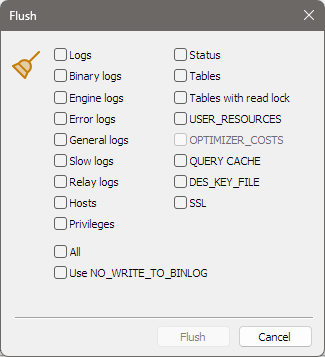
Opening it
Press Ctrl+Alt+F, or choose Tools > Flush….
The options
Tick what you want flushed. Each option runs FLUSH followed by the words in the second column.
| Option | Runs FLUSH ... | Offered on |
|---|---|---|
| Logs | LOGS | every server |
| Binary logs | BINARY LOGS | MySQL and MariaDB 5.1 and later |
| Engine logs | ENGINE LOGS | every server |
| Error logs | ERROR LOGS | every server |
| General logs | GENERAL LOGS | every server |
| Slow logs | SLOW LOGS | every server |
| Relay logs | RELAY LOGS | every server |
| Hosts | HOSTS | MariaDB; MySQL before 8.4 |
| Privileges | PRIVILEGES | every server |
| Status | STATUS | every server |
| Tables | TABLES | every server |
| USER_RESOURCES | USER_RESOURCES | every server |
| OPTIMIZER_COSTS | OPTIMIZER_COSTS | MySQL 5.7 and later |
| QUERY CACHE | QUERY CACHE | MariaDB; MySQL before 8.0 |
| DES_KEY_FILE | DES_KEY_FILE | MariaDB; MySQL before 8.0 |
| SSL | SSL | MariaDB 10.4 and later |
| Tables with read lock | TABLES WITH READ LOCK, then UNLOCK TABLES | every server |
An option the connected server does not have is greyed out and unticked. SQLyog Community offered a fixed list, including options that newer servers no longer have.
All runs every option the server has, one after another, and greys out the individual boxes while it is
ticked. Tables with read lock always comes last, and bonSQL releases the lock straight away with UNLOCK TABLES, so it does not leave your server’s tables locked.
Use NO_WRITE_TO_BINLOG adds NO_WRITE_TO_BINLOG after FLUSH in each statement, asking the server not to
write it to the binary log.
Running it
Click Flush. It is only enabled while at least one option, or All, is ticked. The statements run in the order of the table above. The line above the buttons then says Operation successful, or Error in operation. after showing the server’s error; bonSQL stops at the first error. The dialog stays open, so you can flush something else; click Cancel to close it.
When the dialog closes, by Cancel or the window’s close button, bonSQL saves which boxes are ticked,
including All and Use NO_WRITE_TO_BINLOG, in bonsql.ini in %APPDATA%\bonSQL, and ticks them again
next time. An option the current server lacks is unticked and greyed out, and its saved state is left
alone, so it is still ticked the next time you open the dialog on a server that has it.