
Help Databases and objects
Events
An event is SQL the server runs on a schedule: once at a given time, or repeatedly at an interval. bonSQL writes events as SQL: it opens an editor tab with a statement for you to complete or change, and you run it like any other query.
The commands are under Others > Events, and on the menu you get by right-clicking a database’s Events folder or an event in the Object Browser. With that folder or an event selected, F4, F6, F2 and Del act on events.
Creating an event
Select the database, then choose Others > Events > Create Event… (F4) or Database > Create > Event….
Type a name in Enter new event name and click Create. If an event of that name already exists in the database, bonSQL says so.
A new editor tab opens with a skeleton. It starts with
DELIMITER $$, names the event, and underON SCHEDULEgives three commented-out examples to choose from:- run once,
ATa time; - run
EVERYso often, for ever; - run
EVERYso often between aSTARTStime and anENDStime.
The first two are commented out with
--at the start of the line, the third with/*and*/around it. After those come the optional clauses[ON COMPLETION [NOT] PRESERVE],[ENABLE | DISABLE]and[COMMENT 'comment'], also inside/*and*/, and aDO BEGIN ... ENDblock with the placeholder(sql_statements).- run once,
Uncomment the schedule you want by deleting the
--or the/*and*/, delete the other two, and fill in the time and interval, for exampleEVERY 1 DAY STARTS '2026-11-01 02:00:00'. Replace(sql_statements)with your statements, each ending with;.Press F9, or click Execute query on the toolbar.
The Messages tab shows whether the server accepted it. If the event does not appear in the Object Browser, press F5.
The event scheduler
Just below DELIMITER $$, the skeleton has a comment:
-- SET GLOBAL event_scheduler = ON$$ -- required for event to execute but not create
The server creates the event either way, but only runs events while its event scheduler is on. To check, look
up event_scheduler in Tools > Show > Variables…; see
Server variables and status.
Running the editor tab
In an object editor tab, F9, Ctrl+F9 and the toolbar’s Execute query button all run the whole tab. F8 is not available there. In SQLyog Community the Execute button was greyed out in these tabs; in bonSQL it works.
Changing an event
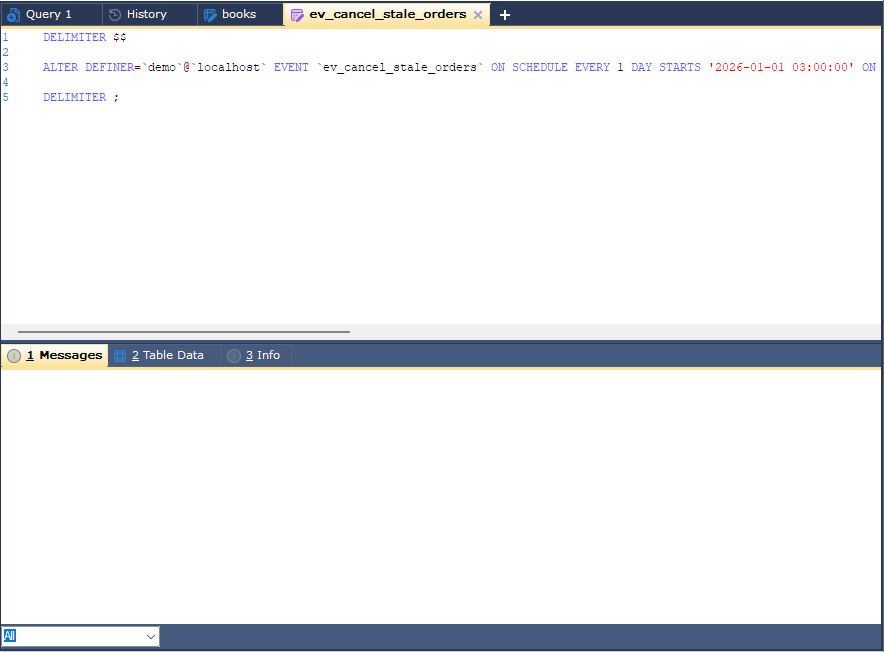
Select the event and choose Others > Events > Alter Event… (F6). bonSQL reads the event’s
definition from the server (SHOW CREATE EVENT) and opens it as an ALTER ... EVENT statement. It arrives
as the server returns it, without line breaks added, so the schedule and options are usually one long line:
scroll to the right to see all of it. Edit the
schedule or the body and execute the tab. Unlike
procedures and triggers, the event is changed in place, not dropped first.
Renaming and dropping
| Command | Does |
|---|---|
| Rename Event (F2) | Lets you type the new name in the Object Browser; bonSQL renames it with ALTER EVENT ... RENAME TO. |
| Drop Event… (Del) | Drops the event after asking you to confirm. |