
Help Databases and objects
Server variables and status
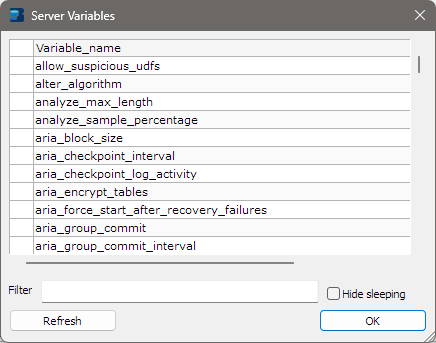
Two windows show what the server reports about itself:
- Server Variables: the server’s settings, from
SHOW VARIABLES, such asmax_connections,character_set_serverorevent_scheduler. - Server Status: its counters, from
SHOW STATUS, such asUptime,Threads_connectedorQuestions.
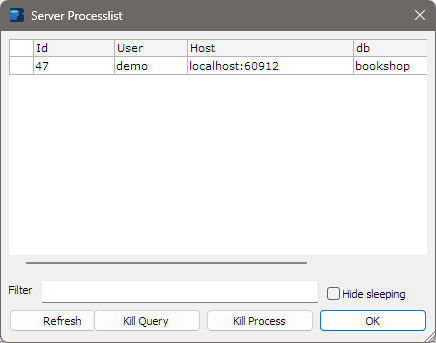
Both are read-only lists of names and values. A third window, Server Processlist, works the same way and is described at the end of this page.
Opening them
Choose Tools > Show > Variables… or Tools > Show > Status…. Each opens for the connection in the active tab.
Each row has the name in the first column and the value in the second, Value. Long values run past the right edge: scroll the list sideways, widen the window, or drag the border between the column headings.
Finding a value
The lists can be long. Type in Filter at the bottom of the window to keep only the rows that contain that
text, in any column, ignoring upper and lower case. The list updates as you type. For example, timeout
shows every variable with a timeout in its name, and utf8 shows every variable whose value mentions it.
Clear the box to see every row again.
Refreshing
The window shows the values as they were when it opened. Click Refresh to read them again, for example to watch a status counter grow. The filter stays in force.
To start the status counters from zero, use Status in the Flush dialog.
Size and position
Both windows can be resized; drag the corner. bonSQL remembers each window’s size and position separately. Click OK to close.
Changing a variable
These windows only show values, and you cannot use the main window while one is open. To change a value,
close the window and run a SET statement in a query tab, for example:
SET SESSION sql_mode = 'STRICT_TRANS_TABLES';
Then open the window again to see the new value. The window uses the same connection as the tab and reads
the list with plain SHOW VARIABLES and SHOW STATUS, without GLOBAL, so it shows the values for that
connection’s own session. After SET GLOBAL, a variable that also has a session value still shows the old
session value there; run SHOW GLOBAL VARIABLES in a query tab to see the global values.
Server Processlist
Tools > Show > Processlist… opens the same kind of window with the connections to the server, from
SHOW FULL PROCESSLIST. It has three extra controls:
| Control | Does |
|---|---|
| Hide sleeping | Hides connections whose Command is Sleep, so the busy ones stand out. |
| Kill Query | Stops the statement the selected connection is running and leaves the connection open (KILL QUERY). |
| Kill Process | Closes the selected connection (KILL), without asking first. Also on the right-click menu as Kill Process. A program that reconnects by itself, bonSQL included, may connect again and run its statement again; to stop a statement, use Kill Query. |
Select a row first; otherwise bonSQL asks you to. bonSQL will not kill the connection it is using itself, and says so. After Kill Query the list is read again; after Kill Process the row is removed. Filter and Refresh work as in the other two windows.
When it does not work
If the server refuses to list the values, bonSQL shows its error and the list stays empty. If it refuses a kill, bonSQL shows the error and the connection stays in the list.