
Help Databases and objects
Emptying a database
Empty Database drops the objects inside a database, such as all its tables or all its stored procedures, but keeps the database itself. It is useful to clear a test database before loading a fresh copy into it.
This cannot be undone. Take a backup first if you may need anything back.
Opening it
Select the database in the Object Browser, then choose Database > More Database Operations > Empty Database…. Right-clicking the database gives the same menu.
Choosing what to drop
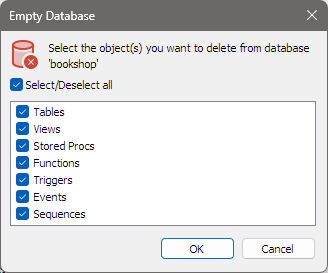
The dialog names the database and lists the kinds of object it can drop, all ticked to start with:
| Item | Drops |
|---|---|
| Tables | Every table. |
| Views | Every view. |
| Stored Procs | Every stored procedure. |
| Functions | Every stored function. |
| Triggers | Every trigger. |
| Events | Every event. |
| Sequences | Every sequence. Listed only on MariaDB 10.3 and later. |
Untick what you want to keep. Select/Deselect all ticks or clears the whole list.
Triggers belong to tables, so dropping the tables drops their triggers too. That is why ticking Tables also ticks Triggers, and Triggers stays ticked while Tables is.
Click OK. There is no second question: the objects are dropped straight away, and the dialog closes. If nothing is ticked, bonSQL asks you to select at least one object instead.
What bonSQL does
- It switches off foreign key checks for the session, so tables can be dropped in any order.
- It drops each object of each ticked kind, one statement at a time.
- It switches foreign key checks back on and refreshes the database in the Object Browser.
Empty, Truncate or Drop
All three are under Database > More Database Operations.
| Command | Result |
|---|---|
| Empty Database… | The chosen kinds of object are gone; the database stays. |
| Truncate Database… (Shift+Del) | Every object stays; the rows of every table are deleted. bonSQL asks first. |
| Drop Database… (Del) | The database and everything in it are gone. bonSQL asks first. |
When it does not work
If the server refuses to drop an object, for example because your user lacks the DROP privilege, bonSQL
shows the server’s error and stops dropping objects of that kind. It then carries on with the next ticked
kind. Objects dropped before the error stay dropped.