
Help Databases and objects
Database schema as HTML
bonSQL can write a description of a database’s tables to an HTML file: every column with its type and attributes, every index and every foreign key. The file opens in your web browser and can be printed or kept with a project’s documents.
Opening it
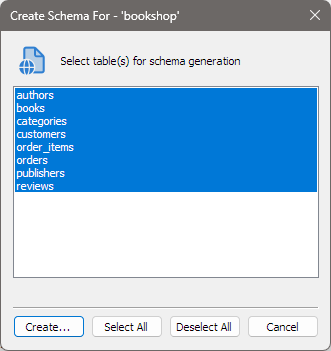
Select the database in the Object Browser, then press Ctrl+Shift+Alt+S or choose Database > Create Schema For Database In HTML…. The dialog’s title names the database.
Choosing the tables
The list, headed Select table(s) for schema generation, shows the database’s tables, all selected to start with. Views are not listed. Click a table to select or deselect it.
| Button | Does |
|---|---|
| Create… | Asks where to save the file (.htm or .html), then writes it. |
| Select All | Selects every table. |
| Deselect All | Clears the selection. |
| Cancel | Closes the dialog without writing anything. |
At least one table must be selected; if none is, bonSQL says Select at least one table. While the file is written, the line under the list says which table bonSQL is working on. When it is done, bonSQL says Schema generation successful, closes the dialog and opens the file with the program Windows uses for HTML files.
What the file contains
- The database name at the top, then a list of the tables, each linked to its section.
- For each table:
- Fields: the columns as the server describes them with
SHOW FULL FIELDS, one row per column with every column of that result, such as type, collation, NULL, key, default, extra and comment. - Indexes: the rows of
SHOW KEYSfor the table. - Foreign keys, if the table has any, with the headings FK Id, Reference Table, Source Column, Target Column and Extra Info.
- A Back link to the list at the top.
- Fields: the columns as the server describes them with
When printed, each table starts on a new page.
Tips
- The file is a snapshot. Create it again after changing the structure.
- Values such as comments and defaults are written into the page exactly as the server returns them. A
comment containing
<or&may not display as typed. - For a copy of the structure that can rebuild the database, use Backup as SQL dump instead.
When it does not work
If bonSQL cannot create or write the file, it says Could not create file. or Could not write into file., and the dialog shows Error while generating schema. Choose a folder you can write to, and check that the file is not open in another program.
If the server refuses to describe a table, bonSQL shows the server’s error first. The Could not write into file. message that follows is then about that error, not about the file.