
Help Tables, columns and indexes
Creating an index
Indexes are made on the 2 Indexes tab of the table designer. You can add them while creating a table or later to an existing one; either way nothing reaches the server until you click Save.
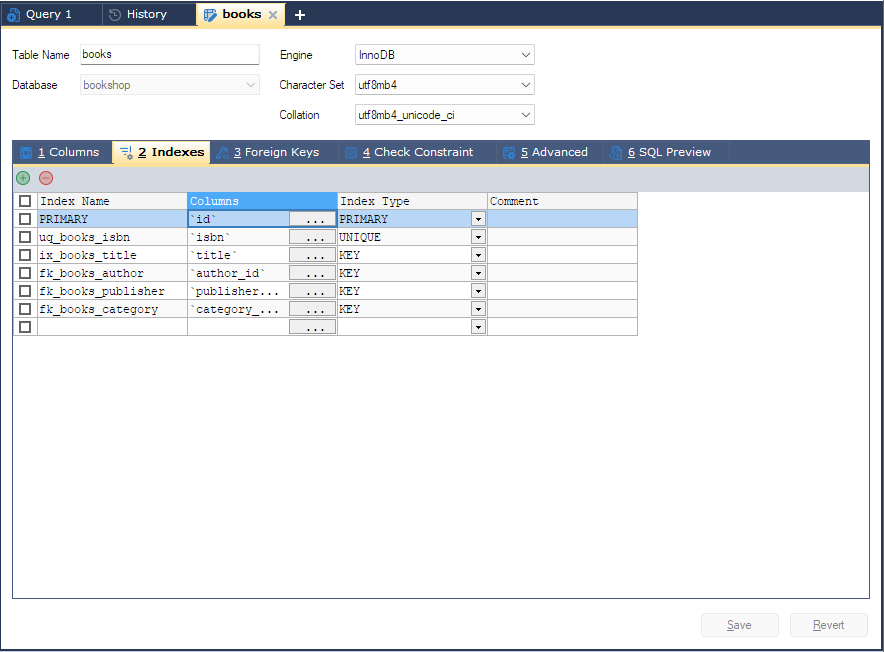
Opening the Indexes tab
- For an existing table: select it in the Object Browser and press F7 (Table > Manage Indexes). The designer opens on the Indexes tab.
- In the Object Browser, expand the table: right-click its Indexes folder, or one of its indexes, and choose Create Index. The same command is on the menu bar as Others > Indexes > Create Index. Both open the designer on the Indexes tab.
- With an index, or the Indexes folder itself, selected, F4 does the same.
- In a designer that is already open: click 2 Indexes.
The grid
Each row is one index. Existing indexes are listed first; type in the empty row at the bottom to add one.
| Grid column | What to enter |
|---|---|
| Index Name | The index’s name. Leave it empty and bonSQL writes no name, so the server chooses one. A primary key is always called PRIMARY and cannot be renamed. |
| Columns | The columns in the index. Click the cell’s button to choose them; see below. |
| Index Type | KEY (an ordinary index), UNIQUE, PRIMARY or FULLTEXT. Left empty, bonSQL writes a plain index. |
| Visibility | Visible or Invisible, written after the column list. Shown on MySQL 8.0.11 and later only, not on MariaDB, and not available for the primary key. |
| Comment | A comment stored with the index. Shown on MySQL 5.5.3 and MariaDB 5.5 and later. |
A table has at most one primary key: choosing PRIMARY on a second row gives
Multiple primary keys cannot be defined.
Ticking PK? on the Columns tab adds the column to the PRIMARY row here, and creates that row if
there is none, so you rarely need to make a primary key on this tab by hand.
Choosing the columns
The … button in the Columns cell opens the Columns window, which lists the table’s columns, including ones you have just added on the Columns tab and not saved yet.
Tick the columns the index should cover.
Use Up and Down to put them in the order the index should have.
Optionally fill in:
Column What it does Length A prefix length, written after the column name as (20). Leave it empty for none.Order ASC or DESC. Shown on MySQL 8.0.11 and later only, not on MariaDB. Click OK. The cell then shows the columns as they will be written, for example
`last_name`(20), `first_name`.
Adding, removing and saving
The green + button above the grid adds a row (Alt+Ins). The red - button deletes the rows whose box, at the start of the row, is ticked (Alt+Del); if no box is ticked, it deletes the row the cursor is in. bonSQL asks before dropping an existing index.
Click Save. For a new table the indexes become part of CREATE TABLE; for an existing table bonSQL sends
add primary key (...), add unique index ..., add fulltext index ..., add key ... or add index ... inside its
ALTER TABLE. An index row with no columns stops the save with No columns selected.
Tips
- Look at the SQL Preview tab before saving to see the exact statement; see SQL preview.
- The Foreign Keys tab offers the referenced table’s indexed columns, so a parent table needs its index before you can point a foreign key at it; see Foreign keys.
- To change or drop an existing index, see Changing an index.