
Help Import, export and backup
Copying to another server
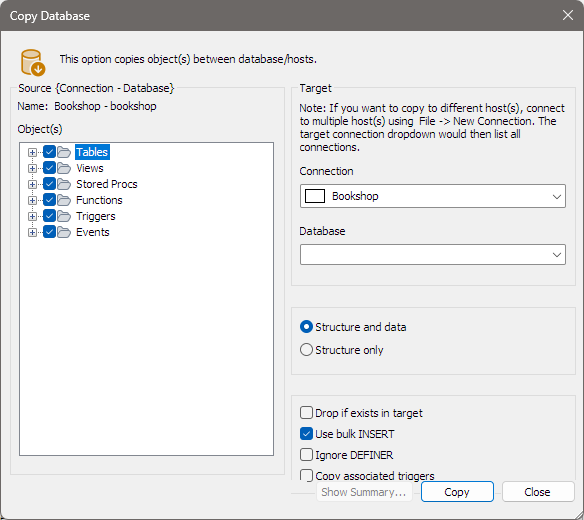
Copy Database copies tables, views, routines, triggers and events from one database to another, on the same server or on another one, in a single step. It saves making an SQL dump and running it on the other server, and nothing is written to disk on the way.
Before you start
The target server must be open in bonSQL too: connect to it with File > New Connection… (Ctrl+M) first. The Connection list in the dialog offers every open connection. To copy within the same server, choose the same connection.
Opening it
Select the source database or table in the Object Browser, then:
- Database > Copy Database To Different Host/Database… to start with the whole database ticked.
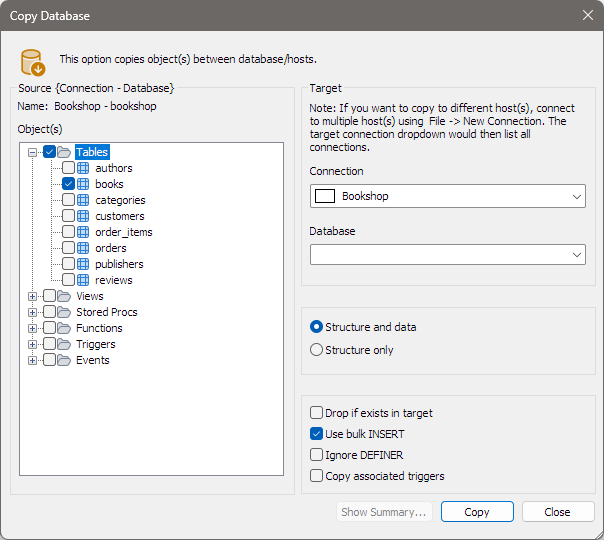
- Table > Copy Table(s) To Different Host/Database… to start with the selected table ticked, or every table if the Tables folder is selected.
Both commands open the same Copy Database window. You can tick or untick objects in it either way.
Source
Name shows the source connection and database. Object(s) lists its objects, grouped as Tables, Views, Stored Procs, Functions, Triggers and Events. Tick what to copy; ticking a group takes all of it. Click the + in front of a group to tick single objects. MariaDB sequences are not offered here; to copy them, use an SQL dump.
Target
| Field | What to choose |
|---|---|
| Connection | The connection to copy to. |
| Database | A database on that connection. Type a new name to have bonSQL create it, with the source database’s character set and collation. |
Options
| Option | Does |
|---|---|
| Structure and data / Structure only | Copy the rows too, or only the definitions. |
| Drop if exists in target | Drops each object you copy (table, view, routine, trigger or event) in the target, if it is there, before creating it again. |
| Use bulk INSERT | Sends many rows per INSERT, which is faster. The size is set under Tools > Preferences, General tab, Max. size (in KB) for BULK INSERT statement(s). Not used with Structure only. |
| Ignore DEFINER | Leaves out the DEFINER clause of views, routines, triggers and events. |
| Copy associated triggers | Also ticks, and copies, the triggers of the tables you ticked. |
bonSQL turns foreign key checks off on the target while it copies, so tables can be copied in any order.
bonSQL remembers these options for next time, except Copy associated triggers, which starts unticked.
Running it
Click Copy. bonSQL opens connections of its own to both servers, so the copy does not disturb your open tabs. The message line shows each table as it is created and filled, and the button reads Stop until it finishes. Show Summary… then lists what was copied, with row counts.
If views or stored programs were copied, bonSQL reminds you that they may still mention the source database by name, and need to be changed by hand.
Copying a table within the same database
To make a copy of a table under another name in the same database, use Table > More Table Operations > Duplicate Table Structure/Data… instead.
When it does not work
| Message | Usually means |
|---|---|
Please select at least one object | Nothing is ticked under Object(s). |
Please select a database or enter the name for new database | Database under Target is empty. |
There was nothing to be copied | The ticked groups had no objects in them. |
Error occurred while copying | A server refused a statement; bonSQL shows the server’s message, for example about a missing privilege or a table that already exists. |
The target list is empty or shows only one server: open a connection to the other server first (see above).