
Help Connecting
Connecting with SSL/TLS
SSL, or TLS as its current versions are called, encrypts everything between bonSQL and the server, so that
nobody on the network can read your password or your data. Some servers require it, for every user or for
particular users (an administrator sets this with REQUIRE SSL or REQUIRE X509 on the user).
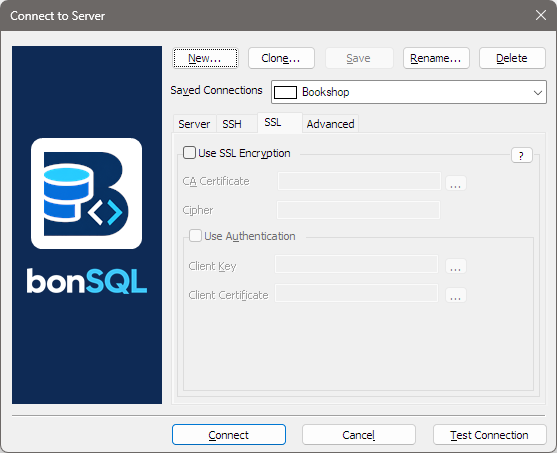
Setting it up
Open the Connect dialog (Ctrl+M), pick or create the connection, and on the SSL tab tick Use SSL Encryption; the fields below it then become available. Type a file’s path into a field, or click the … beside it to choose the file. What bonSQL does depends on what you fill in:
| You fill in | bonSQL |
|---|---|
| Nothing else | Insists on an encrypted connection but does not check the server’s certificate. The traffic is private from onlookers, but bonSQL cannot tell the real server from an impostor. |
| CA Certificate | Insists on encryption and checks the server’s certificate against that certificate authority. Refuses to connect if it does not match. This is the safe choice. |
| CA Certificate, and, after ticking Use Authentication, Client Key and Client Certificate | As above, and proves who you are with your own certificate, for users created with REQUIRE X509 or REQUIRE SUBJECT. |
Cipher is optional: a list of the ciphers bonSQL may use. Leave it empty unless your administrator asks for particular ones.
With the box unticked, bonSQL connects without encryption, even if the server offers it.
Files
The certificate and key files are in PEM format, the usual one for MySQL and MariaDB (ca.pem,
client-cert.pem, client-key.pem). Your administrator provides them; a MySQL server that made its own
certificates keeps them in its data directory.
When it fails
| Message contains | Usually means |
|---|---|
SSL is required, but the server does not support it | The server has no TLS set up; untick the box, or ask for TLS to be enabled. |
TLS/SSL error: No such file or directory | One of the file paths is wrong. |
| A certificate error (error 2026) with a CA file given | The CA file does not match the server’s certificate, or the server’s name is not the one in its certificate. |
Access denied with the box unticked | The user requires SSL; tick the box. |
With an SSH tunnel
SSL and SSH can be used together, but an SSH tunnel already encrypts the path to the SSH machine. SSL on top also protects the last stretch, from the SSH machine to the database server, when they are different machines.