
Help Tables, columns and indexes
Check constraints
A check constraint is a condition every row of the table must meet, such as end_date >= start_date. In
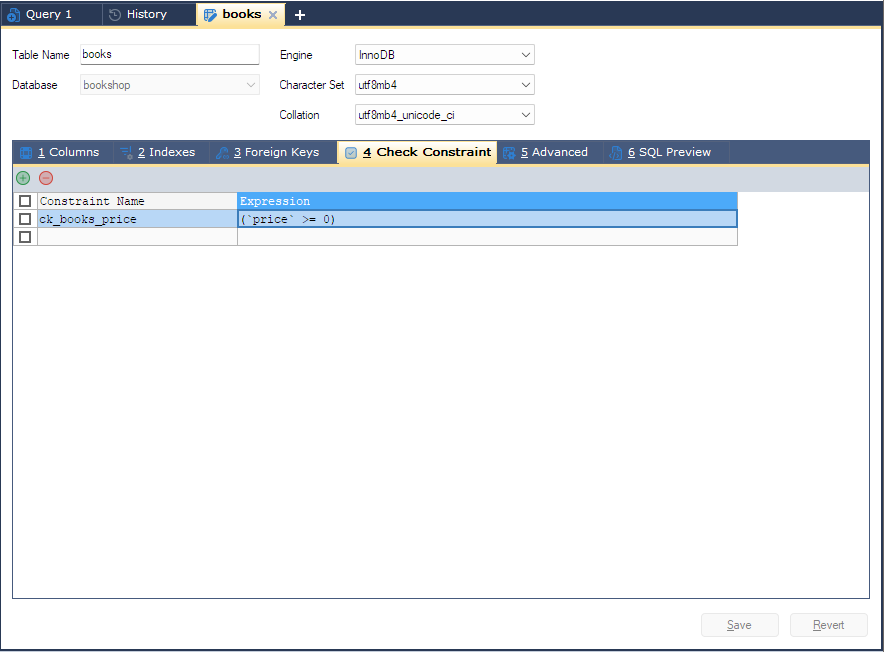
bonSQL they are written on the 4 Check Constraint tab of the table designer. Rules about a single column
can also go in that column’s Check Constraint cell on the Columns tab; see
Creating a table.
Which servers enforce them
Check constraints are enforced by MySQL 8.0.16 and later and by MariaDB 10.2.1 and later. bonSQL
shows the tab whatever the server version and does not warn you on an older server. What an older server
does with a CHECK clause has not been checked for this help, so test on a copy before relying on it there.
Opening the tab
Open the table designer, with F4 for a new table or F6 for an existing one, and click
4 Check Constraint. For an existing table, bonSQL lists the table-level constraints it finds in the
server’s SHOW CREATE TABLE.
The grid
| Grid column | What to enter |
|---|---|
| Constraint Name | The constraint’s name, at most 64 characters. Leave it empty and bonSQL writes no name, so the server chooses one. |
| Expression | The condition, without the word CHECK, for example qty > 0 AND price >= 0. |
Type in the empty row at the bottom to add a constraint, or click the green + button above the grid.
The red - button deletes the rows whose box, at the start of the row, is ticked; bonSQL asks
Do you want to drop the selected check constraint(s)? before removing existing ones. If no box is ticked,
it deletes the row the cursor is in, after asking Do you want to drop this check constraint?.
What is sent
| You do | bonSQL writes |
|---|---|
| Add a constraint to a new table | CONSTRAINT name CHECK (...) inside CREATE TABLE, or CHECK (...) with no name |
| Add one to an existing table | add constraint name CHECK (...) in the ALTER TABLE |
| Change the name or expression of an existing one | drop constraint for the old one and add constraint name CHECK ... for the new one, in the same ALTER TABLE |
| Delete one | drop constraint name |
bonSQL puts the expression in brackets itself, for a new constraint and for a changed one alike, so you can type it with or without the outer brackets.
A row with a name but no expression is marked on the SQL Preview tab with the comment
/* No Expression specified */; fill in the expression or delete the row before saving. A name longer than
64 characters stops the save with Please enter a constraint name less than 64 characters.
JSON columns on MariaDB
MariaDB stores a json column as longtext with a check json_valid(column). bonSQL recognises that pair
and shows the column as json on the Columns tab, with no check, rather than as a text column with a
constraint. A wider check on such a column, such as json_valid(doc) and doc <> '', is left as it is.
Tips
- Check the expression on the SQL Preview tab before saving; see SQL preview.
- Expressions are passed to the server as you type them. If the server rejects one, its error says why and the designer keeps your rows.