
Help Import, export and backup
Backing up a database as an SQL dump
An SQL dump is a text file of SQL statements (CREATE TABLE, INSERT and so on) that rebuilds a
database when it is run. It is the usual way to back up a database, move it to another server, or keep a
copy of its structure. To load a dump back, see Running an SQL script.
Opening it
- Database > Backup Database As SQL Dump… or Tools > Backup Database As SQL Dump…
- Table > Backup/Export > Backup Table(s) As SQL Dump…
- Ctrl+Alt+E
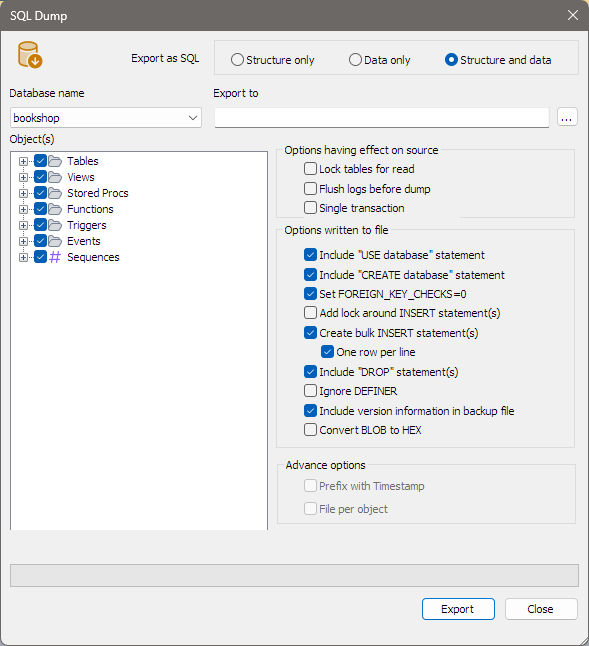
The SQL Dump dialog opens on the database selected in the Object Browser.
What to dump
| Field | What to choose |
|---|---|
| Database name | The database to dump. |
| Object(s) | Tick the objects to include. They are grouped as Tables, Views, Stored Procs, Functions, Triggers, Events and, on MariaDB, Sequences. Tick a group to take all of it. |
| Structure only / Data only / Structure and data | At the top, next to Export as SQL. Whether to write the CREATE statements, the rows, or both. Data only applies to tables only; bonSQL clears the other groups. |
| Export to | The file to write. Click … to choose it; the file type is .sql. If the file exists, bonSQL asks before replacing it. |
Options having effect on source
These change how bonSQL reads the database while it dumps; they are not written to the file.
| Option | Does |
|---|---|
| Lock tables for read | Locks each table for reading (LOCK TABLES ... READ) while it is dumped, so it cannot change half-way. Tables are locked one at a time; for one consistent view of all tables, use Single transaction. |
| Flush logs before dump | Runs FLUSH LOGS on the server. Despite the name, bonSQL sends it before each table it dumps, not once at the start. |
| Single transaction | Reads everything inside one transaction started WITH CONSISTENT SNAPSHOT, instead of locking the tables. When ticked, Lock tables for read is not used. |
Options written to file
| Option | Writes |
|---|---|
| Include “USE database” statement | USE the database, so the dump goes back into a database of the same name. |
| Include “CREATE database” statement | Creates the database if it does not exist. |
| Set FOREIGN_KEY_CHECKS=0 | Turns foreign key checks off while the dump loads, so tables can be created and filled in any order. |
| Add lock around INSERT statement(s) | Locks each table while its rows are inserted. |
| Create bulk INSERT statement(s) | Many rows per INSERT, which loads faster. The size of each statement is set under Tools > Preferences, General tab, Max. size (in KB) for BULK INSERT statement(s). |
| One row per line | With bulk inserts, puts each row on its own line, which is easier to read and compare. |
| Include “DROP” statement(s) | Drops each object before creating it, so the dump replaces what is there. |
| Ignore DEFINER | Leaves out the DEFINER clause of views, routines, triggers and events. |
| Include version information in backup file | A comment at the top naming bonSQL and the server version. |
| Convert BLOB to HEX | Writes BLOB values as hexadecimal instead of escaped text. |
Some options only apply to structure or to data and are greyed out when they do not. Under Advance options, Prefix with Timestamp and File per object are not part of bonSQL and stay greyed out.
BIT columns are written as bit literals, such as b'0101', so they load back with the same value.
bonSQL remembers your choices for next time.
Running it
Click Export. The bar at the bottom shows progress and the object being dumped; the button reads Stop until it finishes, and Close changes to Done. The message under the list says Exported successfully, Aborted by user or Export unsuccessful.
Tips
- For a backup to load on another server, tick Include “CREATE database” statement, Include “USE database” statement and Set FOREIGN_KEY_CHECKS=0.
- To restore over an existing copy, also tick Include “DROP” statement(s). Check the file name first: this replaces the tables on the server you load it into.
- If the target server has different users, tick Ignore DEFINER.
When it does not work
| Message | Usually means |
|---|---|
Could not create dump file | The file is read-only, open in another program, or its folder does not exist. |
Please specify a filename | Export to is empty. |
Select at least one object | Nothing is ticked in Object(s). |
Error No.: and a server message | The server refused a statement; the message gives its reason, for example a missing privilege. |