
Help Tables, columns and indexes
Changing a table
The table designer also changes existing tables. It loads the table’s columns, indexes, foreign keys, check
constraints and options; you edit them; and Save sends only what you changed, as ALTER TABLE
statements.
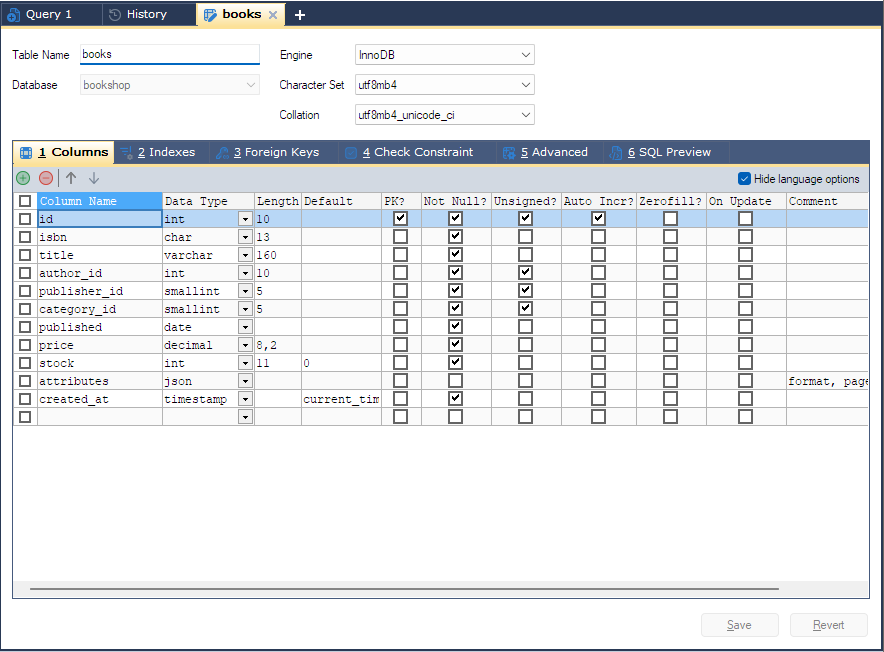
Opening it
Select the table in the Object Browser and press F6, or choose Table > Alter Table, or right-click the table and choose Alter Table. F6 on a column (or on the table’s Columns folder) also opens the designer on the Columns tab, and F6 on an index opens it on the Indexes tab.
Two other commands open the same designer on another tab:
| Command | Opens on |
|---|---|
| Table > Manage Indexes (F7) | Indexes |
| Table > Relationships/Foreign Keys (F10) | Foreign Keys |
If the table already has a designer tab open, bonSQL switches to it rather than opening a second one. The tab is named after the table; an asterisk after the name means unsaved changes.
The tabs and their columns are the same as for a new table; see Creating a table. The Database box is locked, because a table cannot be moved to another database from here.
What Save sends
Save and Revert stay greyed until you change something. On Save, bonSQL checks the grids, then sends, in this order:
- One
ALTER TABLEwith the column, index, new or dropped foreign key, check constraint and table option changes together. - For each existing foreign key you changed, separate
ALTER TABLEstatements: if it kept its name, one drops the key and the next creates it again; if you renamed it, one statement adds the new key and drops the old. See Foreign keys. - If you changed Table Name, a
RENAME TABLEstatement last.
The exact statements are on the SQL Preview tab before you save; see SQL preview.
How changes are written:
| You change | bonSQL writes |
|---|---|
| A column’s name, type or attributes | change old_name new_name with the full new definition |
| The order of columns | the moved column’s definition with after the column before it |
| A new column | add column |
| A deleted column | drop column |
| A generated (virtual or stored) column | DROP COLUMN and add column again, with after/first so it keeps its place |
| An index | drop index and add again; see Changing an index |
| A check constraint | drop constraint and add constraint again |
| An engine, character set or collation at the top | ENGINE=, charset=, collate= |
When it succeeds, bonSQL says Table altered successfully, reloads the table into the designer and
refreshes the Object Browser.
MariaDB: invisible, compressed and versioned tables
- A column marked Invisible? or Compressed? keeps that attribute when you change it in the designer; the two grid columns are shown when the server has these features.
- A MariaDB JSON column is stored by the server as
longtextwith ajson_validcheck. The designer shows it asjsonwith no check, and writes it back asjson. - MariaDB refuses
ALTER TABLEon a system-versioned table unless history changes are allowed. bonSQL putsSET STATEMENT system_versioning_alter_history=KEEP FORin front of itsALTER TABLEfor such a table, which keeps the history rows and leaves your own session setting alone. System versioning itself is switched on and off on the Advanced tab.
Revert
Revert throws away every change since the last save and puts every tab back to what the designer last read from the server. It does not undo anything already saved.
Closing the tab
If the tab has unsaved changes, closing it asks:
The content of this tab has been changed. Do you want to save the changes?
Prompt if a tab with unsaved changes is closed in Tools > Preferences turns this question off.
While a save is running, the tab cannot be closed. bonSQL says:
This table is still being saved. Close the tab when the save has finished.
Wait for the result message, then close it. Large tables can take a while, because the server may rebuild the table for the change.
When it does not work
| Message | Usually means |
|---|---|
Column name not specified, Data type not specified, Duplicate column name | A row on the Columns tab is incomplete or repeats a name. bonSQL selects the row. |
Length must be specified for varchar data type | varchar, varbinary, enum and set need a Length. |
The selected table does not support foreign keys... | The table’s engine has no foreign keys, so the Foreign Keys tab cannot be used. |
| An error from the server | The server refused a statement. The designer keeps your changes so you can correct them and save again. If the main ALTER TABLE went through and a foreign key statement after it failed, bonSQL reloads the table and keeps the foreign keys that were not saved on the Foreign Keys tab. |