
Help Connecting
Advanced connection settings
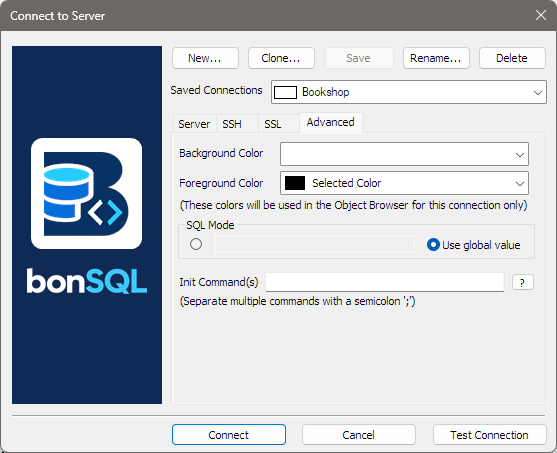
The Advanced tab of the Connect dialog (Ctrl+M) holds settings that apply to one saved connection: its colours, its SQL mode, and statements to run each time it connects. Pick the connection under Saved Connections first, then click Save after changing anything.
Colours
Background Color and Foreground Color set the colours of that connection’s Object Browser and of its tab at the top of the main window. Each list offers a few colours and Other Colors… for any colour you like. Use them to tell connections apart at a glance, for example red for production and green for a test server. They apply in every theme. The same two colours can be changed while connected with Edit > Change Object Browser Color; see The Object Browser.
SQL Mode
The server’s SQL mode decides how strict it is about data, for example whether a value that does not fit is refused or quietly cut down. Use global value (the default) keeps the server’s own setting. To set your own for this connection only, click the round button on the left of the box and type the modes into the box, separated by commas, for example:
STRICT_TRANS_TABLES,NO_ZERO_DATE,NO_ENGINE_SUBSTITUTION
Leaving the box empty with that button chosen turns every mode off.
Init Command(s)
Statements bonSQL runs each time this connection is opened, separated by semicolons. For example, to work in UTC and with a particular character set:
SET time_zone = '+00:00'; SET NAMES utf8mb4
They also run again when the connection drops and bonSQL reconnects, so a reconnected session keeps your settings. The ? button beside the box opens this page.